-1200x630.png&w=3840&q=75)

The Advent of MCP
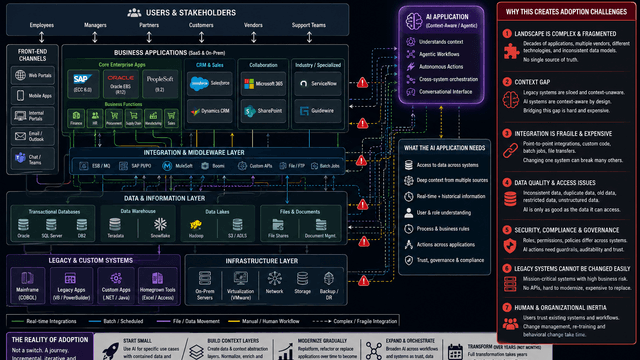
Teams have been trying to get real value out of AI for a while, but most tools still feel separate from the systems people use every day. The Model Context Protocol (MCP) takes a different approach. Instead of adding yet another tool to your stack, MCP lets AI connect to the systems you already depend on so it can support real work in a way that fits naturally with how your team operates.
For most teams, this means quicker answers, smoother processes, and less time spent jumping between systems.
What Is MCP?
MCP is a standard that shows AI how to interact with your business data safely and clearly. It defines how the assistant can request information, take actions, and follow your rules.
Instead of forcing you to translate your tools and data for it, the AI can plug directly into the tools you’re already using and work with information the same way your team already does.
For an introductory overview, see the Model Context Protocol documentation: https://modelcontextprotocol.io/docs/getting-started/intro
A Short History of MCP
Anthropic introduced the Model Context Protocol (MCP) in late 2024 as an open standard for giving AI systems a consistent way to access tools and data. Developers quickly began creating MCP servers for common platforms, expanding its ecosystem. By early 2025, major AI providers—including OpenAI and Google—signaled plans to support the protocol. MCP is now used across development tools and business applications as a standardized method for enabling AI to retrieve information or take actions without custom integrations.
Read the original announcement here: https://www.anthropic.com/news/model-context-protocol
Architecture Overview

How This Diagram Was Created Using Figma’s MCP Integration
This architecture diagram was generated automatically using the Figma MCP integration, which enables an AI assistant to create diagrams directly inside FigJam using structured diagram instructions. Instead of manually placing shapes or drawing connections, the assistant sends a structured definition of the diagram’s components and relationships through an MCP-powered tool call, and Figma converts that description into a visual diagram.
The workflow is:
- Interpret the structural explanation of the architecture (such as the relationship between an AI client, an MCP client layer, an MCP server, and the underlying Channlworks data systems).
- Provide those components and relationships through a structured request handled by the Figma MCP server.
- Figma automatically renders the diagram in FigJam, creating an editable and collaborative resource for teams.
This approach makes it easier to build consistent, accurate architectural diagrams and maintain them over time without recreating them manually whenever changes occur.
Learn more about the Figma MCP server here:
https://help.figma.com/hc/en-us/articles/32132100833559-Guide-to-the-Figma-MCP-server
What MCP Enables With Channlworks
With MCP, Channlworks can share the right business data with AI in a predictable and secure way. This allows the assistant to support everyday work more effectively while staying aligned with how your team already operates.
- One entry point to business data:
The Channlworks MCP server provides a single, consistent way for AI to access CRM records, partner relationships, notes, and program details. This reduces the need to switch between systems and helps the assistant give answers based on complete, up-to-date information. - Faster action on work:
The assistant can help manage leads, approve them, or convert them into opportunities using the same information stored in Channlworks. Routine updates or checks can be handled more quickly, making it easier to keep work moving. - Smoother collaboration:
With shared context on organizations, accounts, contacts, and notes, the assistant can support conversations with relevant details when needed. This helps teams stay aligned without manually digging for past information. - Integration made simpler:
MCP removes the need for custom, one-off connectors by giving Channlworks a standard way to expose its data. New AI tools that support MCP can connect with minimal setup, keeping integrations consistent and easier to maintain over time. - Agentic workflow support:
MCP provides the structured access needed for systems that enable agent-style workflows, making it easier for those platforms to read data, take allowed actions, and keep work aligned across tools. - Better financial visibility:
MDF, payables, and receivables are accessible through the same interface, allowing the assistant to provide clear summaries for reviews and approvals. Users get the context they need without navigating multiple screens. - Robust access control:
Role-based permissions and organization boundaries apply automatically, ensuring the assistant only works with the data each user is authorized to view. Existing security practices carry through without any extra setup.
Why It Matters Now
Your teams already use Channlworks to manage deals, programs, and shared work. MCP adds an AI layer that understands that structure and uses your existing data directly. There’s no new system to learn or duplicate—just a more capable assistant that fits naturally into your daily work.